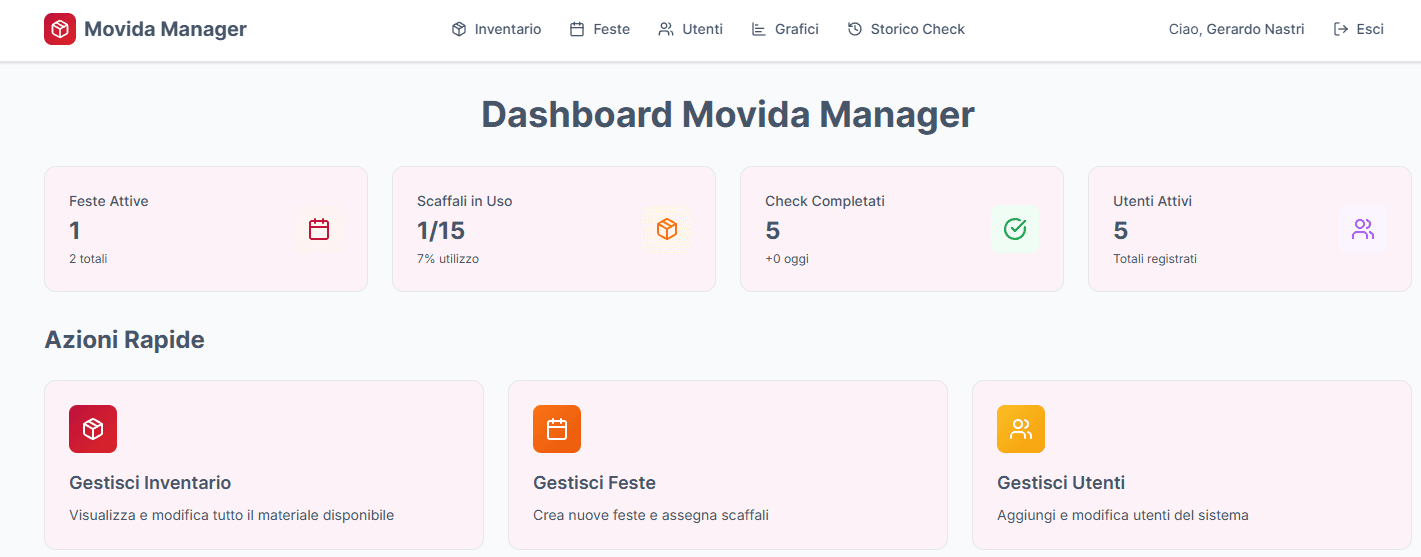
Movida Manager — Event & Inventory Admin Panel
Production-ready admin panel for event operations, inventory control and staff management, designed as an offline-first PWA with resilient data synchronization.
Movida Manager is a production-oriented admin panel built to support real-world event operations: event planning, inventory assignment, staff material checks and issue tracking.
The system is not a demo project, but an internal operational tool designed to remain reliable even in environments with unstable or absent network connectivity.
The application adopts an offline-first PWA architecture with a custom synchronization layer, ensuring data consistency, operational continuity and traceability of critical actions.
Key Features
-
Event Management
Create, edit and manage events with a defined lifecycle. Inventory can be assigned per event with automatic availability checks. -
Centralized Inventory Control
Unified inventory system with quantity tracking and status management (available, assigned, missing, damaged). Inventory is automatically updated after event completion. -
Staff Material Checks
Staff members authenticate via Supabase Auth and access only assigned events.
Checklist-driven workflows allow staff to report missing or damaged items and attach photos or documents. -
Authentication & Permissions
Role-based access control (Admin / Staff) enforced both server-side and client-side.
Protected routes, permission-aware UI rendering and defensive validation on critical workflows. -
Notifications & Integrations
Real-time alerts via Telegram Bot API and Web Push notifications for missing or damaged materials. -
File Storage
Supabase Storage integration for event-related assets such as photos, documents and damage reports. -
Analytics (Supporting Feature)
Operational dashboards providing insight into inventory loss trends, frequently missing items and event quality metrics.
Analytics support decision-making but are not the core focus of the system. -
Offline-First PWA
Installable Progressive Web App with advanced caching, local persistence and a resilient synchronization queue to guarantee usability without connectivity.
Technology Stack
- Frontend: Next.js 16 (App Router), React 19, Tailwind CSS, Radix UI, Framer Motion, Lucide Icons
- Backend & Data: Supabase (Authentication, Database, Storage)
- State & Data Fetching: SWR, Context API
- PWA & Offline: @ducanh2912/next-pwa, IndexedDB (idb), custom Service Worker
- Integrations: Telegram Bot API, Web Push (VAPID)
- Architecture: Server-side permission checks, separation of UI, business logic and data access layers
Architecture Overview
Design Principles
The application is designed as an internal operational tool, prioritizing reliability, data consistency and fault tolerance over visual experimentation.
Separation of Concerns
- UI components: presentation and accessibility
- Business logic: inventory rules, workflows and validations
- Data access layer: Supabase adapters with permission enforcement
Security Model
Authentication is handled by Supabase Auth.
Permissions are enforced on both server-side data fetching and client-side routing to prevent unauthorized access or role escalation.
Case Study: Offline-First Architecture
To ensure operational continuity in venues with unreliable connectivity, Movida Manager implements a multi-layer offline strategy.
1. Multi-Tier Caching Strategy
- NetworkFirst for critical APIs (
/rest/v1/): always attempts live data, falling back to cache after a 10s timeout. - CacheFirst for static assets and storage files, with long TTL to improve performance.
- Safety switch: a custom Service Worker interceptor bypasses cache for
supabase.corequests when the network is available, preventing stale inventory data.
2. Advanced State Persistence
SWR manages in-memory state, which would normally be lost on refresh.
A custom SWR cache provider serializes cache writes asynchronously to IndexedDB.
Result: the application rehydrates instantly from disk on reload, displaying the last known inventory state before the network responds.
3. Resilient Mutations & Sync Queue
Offline writes represent the core challenge of offline systems.
- Failed POST/PUT requests are intercepted by a custom
offline-fetcher - Requests are serialized into a local Outbox Queue stored in IndexedDB
- Upon network restoration, queued mutations are replayed FIFO and synchronized transparently with Supabase
This guarantees that inventory operations are never lost, even during prolonged offline sessions.
4. Engagement & Alerts
Web Push notifications and Telegram alerts ensure administrators are informed of critical issues as soon as connectivity is restored.
Deployment
The project is deployed using Vercel, which provides native support for Next.js App Router and serverless functions.
Repository
- GitHub Repository: https://github.com/gerardonastri/equipment-management